
Plugin Instance and Lifecycle
The core of every Nekro Agent plugin is an instance of the NekroPlugin class. This instance not only defines the basic information of the plugin but also serves as a mounting point for various functions and event callbacks. Understanding the creation of plugin instances and their complete lifecycle is crucial for developing stable and feature-rich plugins.
NekroPlugin Instance
In your plugin's main file (e.g., plugin.py), you first need to import and create a NekroPlugin instance:
from nekro_agent.api.plugin import NekroPlugin

plugin = NekroPlugin(
    name="My Cool Plugin",
    module_name="my_cool_plugin",
    description="This plugin can do many cool things.",
    version="1.0.0",
    author="DeveloperName",
    url="https://github.com/developer/my_cool_plugin",
    support_adapter=["onebot_v11", "telegram"],  # Optional, list of supported adapters
    is_builtin=False,  # Usually False for third-party plugins
    is_package=False   # May need adjustment if your plugin has a complex package structure
)
Core Parameter Analysis:
name(str): The display name of the plugin, which will appear in the Nekro Agent user interface.module_name(str): The module name of the plugin, must be a valid name for a Python module and remain unique among all plugins. Usually consistent with the plugin's directory name. It is used for internal identification and management of the plugin.description(str): A brief description of the plugin, explaining its main functionality.version(str): The version number of the plugin, recommended to follow semantic versioning (e.g.,1.0.0).author(str): The name of the plugin's author or development team, must consist of English letters, numbers, and underscores, and cannot start with a number.url(str): URL pointing to the plugin's project repository, documentation, or homepage.support_adapter(List[str], optional): List of adapters supported by the plugin, such as["onebot_v11", "telegram"]. If not specified, all adapters are supported by default.is_builtin(bool, optional, defaultFalse): Marks whether the plugin is a built-in Nekro Agent plugin.is_package(bool, optional, defaultFalse): Marks whether the plugin is managed as a Python package.
The NekroPlugin instance (plugin) will serve as the calling object for all subsequent decorators, used to mount sandbox methods, configurations, lifecycle callbacks, etc.
Plugin Lifecycle
The plugin lifecycle describes the entire process from when the plugin is discovered by the system, loaded, run, to finally unloaded. Nekro Agent provides a series of decorators that allow you to execute custom logic at specific stages of the lifecycle.
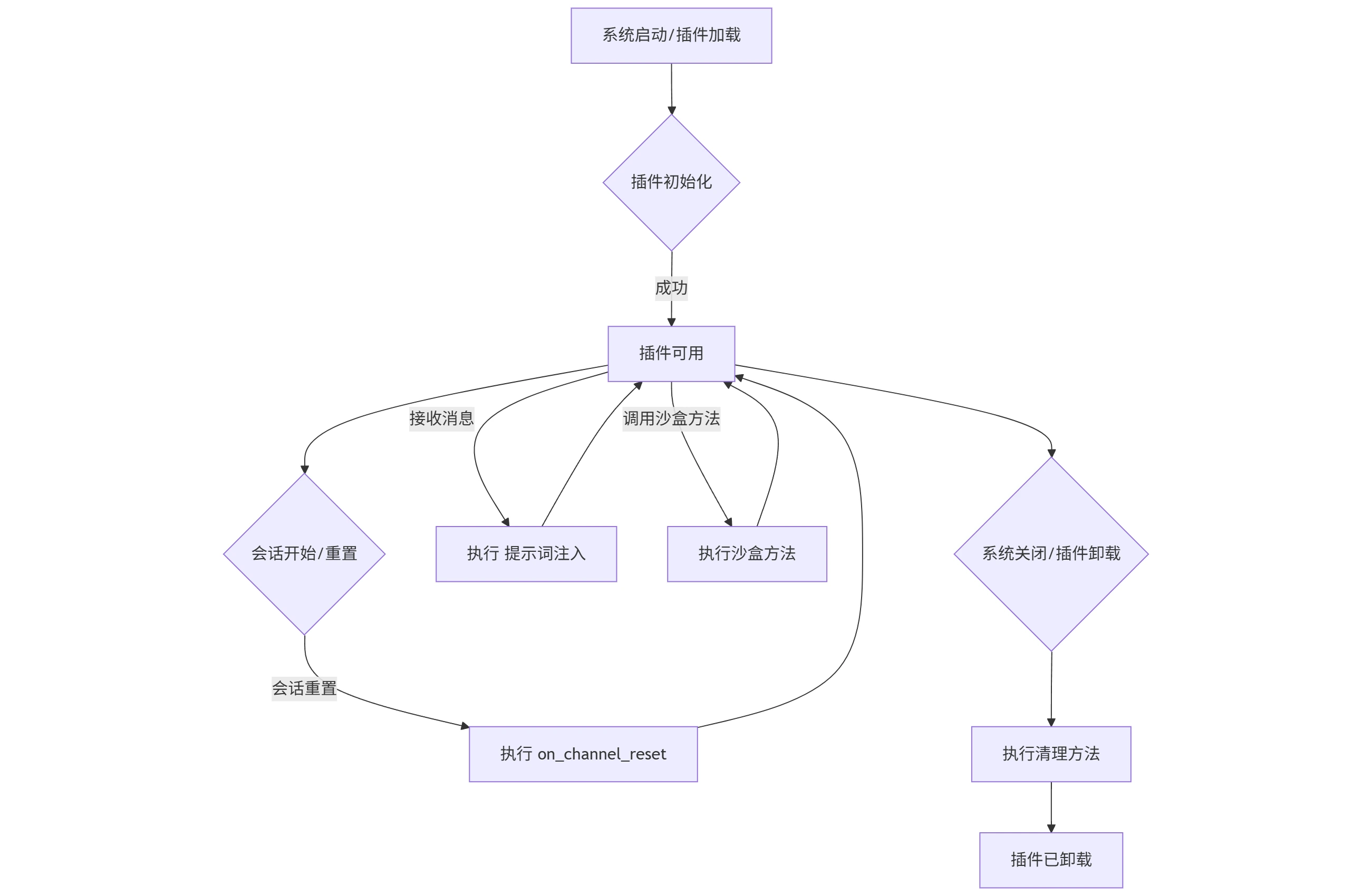
1. Initialization (@plugin.mount_init_method())
When Nekro Agent first loads the plugin (usually when the Agent starts or the plugin is dynamically enabled), the async function registered through the @plugin.mount_init_method() decorator will be executed. This stage is ideal for performing setup work that only needs to be done once.
Use Cases:
- Resource Preparation: Create or connect to databases, initialize file systems (such as creating data directories required by the plugin).
- State Initialization: Set the initial state of the plugin, load default configurations or data.
- External System Connection: If the plugin needs to interact with external services, connections can be established here.
- Environment Validation: Check if necessary dependencies or environment variables are met.
Example:
from nekro_agent.api import core
from qdrant_client import models as qdrant_models # Assuming use of qdrant

@plugin.mount_init_method()
async def initialize_plugin():
    core.logger.info(f"Plugin '{plugin.name}' is initializing...")
    # Example: Initialize vector database collection
    try:
        client = await core.get_qdrant_client() # Get Qdrant client
        collection_name = plugin.get_vector_collection_name("my_data") # Generate unique collection name for the plugin

        collections = await client.get_collections()
        collection_names = [collection.name for collection in collections.collections]

        if collection_name not in collection_names:
            core.logger.info(f"Creating vector database collection: {collection_name}")
            await client.create_collection(
                collection_name=collection_name,
                vectors_config=qdrant_models.VectorParams(
                    size=768,  # Example dimension, adjust according to your embedding model
                    distance=qdrant_models.Distance.COSINE,
                ),
            )
            core.logger.success(f"Collection {collection_name} created successfully")
        else:
            core.logger.info(f"Collection {collection_name} already exists")
    except Exception as e:
        core.logger.error(f"Plugin '{plugin.name}' failed to initialize vector database: {e}")
core.logger.success(f"Plugin '{plugin.name}' initialization complete.")Note: The initialization method should be asynchronous (async def). If an error occurs during initialization, it should be properly handled and logged to ensure the Agent can continue running.
2. Session Reset Callback (@plugin.mount_on_channel_reset())
When a specific chat session is reset (for example, when the user clears chat history or session state), the async function registered through the @plugin.mount_on_channel_reset() decorator will be called. This callback receives an AgentCtx object containing information about the reset session.
Use Cases:
- Clean up plugin data related to a specific session (such as cache, state).
- Reset plugin-specific settings for that session.
Example:
from nekro_agent.api.schemas import AgentCtx

@plugin.mount_on_channel_reset()
async def handle_channel_reset(_ctx: AgentCtx):
    core.logger.info(f"Plugin '{plugin.name}' received session {_ctx.from_chat_key} reset event.")
    # Example: Clear plugin-specific cache for this session
    # await plugin.store.delete(chat_key=ctx.from_chat_key, store_key="session_cache")
core.logger.info(f"Plugin-specific data for session {_ctx.from_chat_key} has been cleaned up.")Note: Misuse of this callback may affect Agent performance or normal conversation flow. Most plugin functionality should be implemented through sandbox methods.
3. User Message Callback (@plugin.mount_on_user_message())
When a user sends a message, the async function registered through the @plugin.mount_on_user_message() decorator will be called. This callback can be used to listen to, preprocess, or intercept user messages.
Use Cases:
- Message Preprocessing: Process, filter, or enhance user messages before AI processing.
- Access Control: Perform access control based on user identity or message content.
- Message Statistics: Record user message usage or behavior analysis.
- Auto Reply: Provide immediate responses to specific types of messages.
Example:
from nekro_agent.api.message import ChatMessage
from nekro_agent.api.signal import MsgSignal

@plugin.mount_on_user_message()
async def handle_user_message(_ctx: AgentCtx, message: ChatMessage) -> MsgSignal | None:
    """Callback function for handling user messages"""

    # Example: Message content filtering
    if "forbidden_word" in message.content_text:
        core.logger.warning(f"User {_ctx.from_user_id} sent a message containing forbidden words")
        return MsgSignal.BLOCK_ALL  # Block message from being recorded to history and prevent subsequent processing

    # Example: Special command handling
    if message.content_text.startswith("!plugin:"):
        command = message.content_text[8:].strip()
        await _ctx.send_text(f"Plugin command received: {command}")
        return MsgSignal.BLOCK_TRIGGER  # Allow message to be recorded but prevent triggering AI processing

    # Example: Message statistics
    await plugin.store.set(
        user_key=_ctx.from_user_id,
        store_key="message_count",
        value=str(int(await plugin.store.get(user_key=_ctx.from_user_id, store_key="message_count") or "0") + 1)
    )

    # Return None to indicate normal message processing
    return None
Return Value Explanation:
NoneorMsgSignal.CONTINUE: Message is processed normally and continues to be passed to subsequent processesMsgSignal.BLOCK_TRIGGER: Allow message to be recorded to history but prevent message from triggering subsequent processingMsgSignal.BLOCK_ALL: Block message from being recorded to history and also prevent message from triggering subsequent processing
4. System Message Callback (@plugin.mount_on_system_message())
When the system sends a message (such as admin commands, system notifications, etc.), the async function registered through the @plugin.mount_on_system_message() decorator will be called.
Use Cases:
- System Event Monitoring: Monitor system-level messages and events.
- Management Function Integration: Respond to admin commands or system state changes.
- Logging: Record important system messages.
Example:
@plugin.mount_on_system_message()
async def handle_system_message(_ctx: AgentCtx, message: str) -> MsgSignal | None:
    """Callback function for handling system messages"""

    core.logger.info(f"Plugin '{plugin.name}' received admin command: {admin_command}")

    return None
5. Prompt Injection (@plugin.mount_prompt_inject_method())
Prompt injection allows plugins to dynamically add content to the system prompt before AI processes user messages. This is an important mechanism for influencing AI behavior and providing contextual information.
Use Cases:
- Context Enhancement: Provide AI with current session state information, user preferences, etc.
- Role Definition: Set specific roles or behavior patterns for AI.
- Functionality Prompts: Provide AI with more detailed plugin usage guidance.
Example:
@plugin.mount_prompt_inject_method(
    name="user_preference_injection",
    description="Inject user preferences and status information to AI"
)
async def inject_user_context(_ctx: AgentCtx) -> str:
    """Inject user context information into AI prompts"""

    # Get user preferences
    user_preferences = await plugin.store.get(
        user_key=_ctx.from_user_id,
        store_key="preferences"
    )

    # Get session state
    session_mode = await plugin.store.get(
        chat_key=_ctx.from_chat_key,
        store_key="mode"
    )

    prompt_parts = []

    if user_preferences:
        prompt_parts.append(f"User preference settings: {user_preferences}")

    if session_mode:
        prompt_parts.append(f"Current session mode: {session_mode}")

    return "\n".join(prompt_parts)
For detailed prompt injection mechanisms, please refer to the Prompt Injection chapter.
6. Cleanup (@plugin.mount_cleanup_method())
When the plugin is unloaded or Nekro Agent shuts down, the async function registered through the @plugin.mount_cleanup_method() decorator will be executed. This stage is used to release all resources occupied by the plugin, ensuring the system cleanly shuts down or reloads the plugin.
Use Cases:
- Resource Release: Close database connections, release file handles, stop background tasks, etc.
- State Reset: Clear global variables or cache to ensure a fresh state on next load.
- External System Disconnection: If the plugin maintains long connections with external services, they should be disconnected here.
Example:
@plugin.mount_cleanup_method()
async def cleanup_plugin():
    core.logger.info(f"Plugin '{plugin.name}' is cleaning up...")
    # Example: Close possible database connection pools or clear temporary files
    # await close_database_connections()
    # await clear_temporary_files()
core.logger.success(f"Plugin '{plugin.name}' cleanup complete.")Importance: Proper cleanup is crucial for plugin stability and maintainability, especially during development and debugging phases when plugins are frequently reloaded. If resources are not properly cleaned up, it may lead to:
- Resource Leaks: Such as memory leaks, unreleased file handles.
- State Conflicts: Reloaded plugins may inherit residual states from old plugins.
- Abnormal Behavior: Plugin performance does not meet expectations.
Ensure your initialization and cleanup methods appear in pairs, properly managing plugin resources and state.
Advanced Features
Dynamic Method Collection Filter (@plugin.mount_collect_methods())
The dynamic method collection filter allows plugins to dynamically decide which sandbox methods are available in the current state based on context (such as user permissions, session state, etc.). This is very useful for implementing permission control and personalized functionality.
Use Cases:
- Permission Control: Restrict available functions based on user identity.
- Conditional Functionality: Dynamically enable/disable functions based on session state or configuration.
- Personalized Experience: Provide different function sets for different users.
Example:
@plugin.mount_collect_methods()
async def collect_available_methods(_ctx: AgentCtx) -> List[SandboxMethod]:
    """Dynamically collect available methods based on context"""

    # Check session type
    if _ctx.channel_type == "group":
        # Group chat specific functions
        return [group_method_xxx, group_method_yyy]
    else:
        return [private_method_xxx, private_method_yyy]
Plugin Documentation Support
NekroPlugin supports automatic loading and display of plugin documentation, enhancing user experience:
Documentation Loading Priority:
README.mdfile in the plugin directory__doc__string of the plugin module
Example:
"""
My Cool Plugin

This plugin provides the following features:
- User preference management
- Intelligent recommendation system
- Data analysis tools

## Usage

1. Configure API keys
2. Set user preferences
3. Start using plugin features

## Notes

- Ensure network connection is normal
- API keys need to be updated regularly
"""

from nekro_agent.api.plugin import NekroPlugin

plugin = NekroPlugin(
    name="My Cool Plugin",
    # ... other parameters
)

# Plugin implementation code...
Vector Database Collection Naming
The plugin provides convenient vector database collection naming methods to ensure data isolation between different plugins:
# Get plugin-specific collection name
collection_name = plugin.get_vector_collection_name("user_embeddings")
# Returns: "author.module_name-user_embeddings"

# Get plugin default collection name
default_collection = plugin.get_vector_collection_name()
# Returns: "author.module_name"
Plugin Storage Access
Each plugin has independent persistent KV storage, accessed through the plugin.store attribute.
# Use storage in any plugin method
@plugin.mount_sandbox_method(SandboxMethodType.TOOL, "save_data", "Save data")
async def save_data(_ctx: AgentCtx, key: str, value: str) -> str:
    await plugin.store.set(
        chat_key=_ctx.from_chat_key,
        store_key=key,
        value=value
    )
    return f"Data saved: {key} = {value}"
For detailed storage usage, please refer to the Data Storage chapter.
Plugin Configuration Access
Plugins can access their configuration through the plugin.config attribute:
@plugin.mount_sandbox_method(SandboxMethodType.AGENT, "get_status", "Get plugin status")
async def get_plugin_status(_ctx: AgentCtx) -> str:
    config = plugin.get_config()

    return f"""
    Plugin Status:
    - Name: {plugin.name}
    - Version: {plugin.version}
    - Enabled: {plugin.is_enabled}
    - API Endpoint: {config.api_endpoint if hasattr(config, 'api_endpoint') else 'Not configured'}
    """
By properly using these features, you can create powerful and user-friendly Nekro Agent plugins.